
Playing Without a License (Offline Mode & Alternative Accounts)
XMCL is an open-source launcher designed to respect player freedom. If you do not currently own a paid Minecraft Java Edition license, or if you want to test modpacks offline without connecting to Mojang's authentication servers, XMCL provides full support for Offline Mode and community skin networks.
⚙️ 1. Enabling Developer Mode
To access offline accounts and third-party skin servers, you first need to enable Developer Mode in XMCL settings:
Click on Settings (gear icon in the bottom-left corner of the sidebar).
Locate the "Developer Mode" toggle and switch it ON:
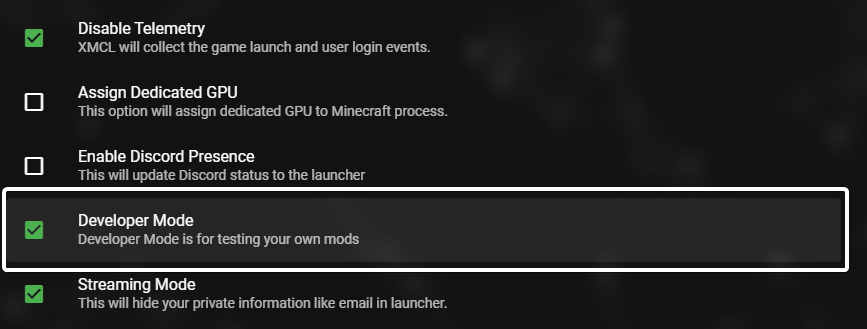
Once Developer Mode is enabled, the Account Manager will display additional authentication providers when adding an account.
👥 2. Available Account Types
Play locally without an internet connection to authentication servers. Simply pick any username you like. Works perfectly for single-player worlds, local mod testing, and LAN or community servers configured with online-mode=false.
A major free community authentication and skin server. Allows you to upload custom character skins and capes that are visible to other players using LittleSkin or CustomSkinLoader. Website: https://littleskin.cn
A widely used global third-party authentication and skin network. Offers cloud skins, HD capes, and authorization compatible with many community servers. Website: https://ely.by
Connect to any custom private or community authentication server using standard Yggdrasil API URLs.
🎮 3. How to Add and Switch Accounts
- Click on your profile icon in the top-right corner to open the Account Manager.
- Click "Add Account".
- Select Offline, LittleSkin, Ely.by, or Custom Auth Server.
- Enter your username or login credentials.
- Click on the newly added account to make it Active.
💡 4. Differences Between Account Types
| Feature | Microsoft Account (Official) | Offline Account | LittleSkin / Ely.by |
|---|---|---|---|
| Price | Paid (Minecraft License) | Free | Free |
| Official Online Servers (Hypixel, etc.) | ✅ Yes | ❌ No | ❌ No |
| Community / LAN Servers | ✅ Yes | ✅ Yes (online-mode=false) | ✅ Yes |
| Single-player & Modpacks | ✅ Yes | ✅ Yes | ✅ Yes |
| Custom Skins & Capes | ✅ Official Mojang Skins | ⚠️ Local / Default | ✅ Network Skins & Capes |
❓ Frequently Asked Questions
Can I join Hypixel or other official servers with an Offline account?
No. Official public servers verify player identity against Mojang's authentication servers (online-mode=true), which requires an official Microsoft account with a valid Java Edition license.
How can I play with friends without an official license?
You can use XMCL's built-in P2P Multiplayer / LAN sharing feature or host a community server with online-mode=false.
👉 Encountering Microsoft login or license issues? Read our Microsoft Troubleshooting Guide